
Your AI Agent Keeps Forgetting. Here's Why Context Is the Real Architecture Problem
Why RAG, knowledge graphs, and enterprise memory aren't just buzzwords—they're the operating system for trustworthy agents.
Your finance team deploys an AI agent to help close the books. It has API access to your ERP. It can query your policy database. It seems capable. But the results are unsettling: it cites an accounting policy that expired last quarter, mixes revenue data from two different legal entities, and then forgets it already approved a journal entry. The team spends more time auditing the agent's work than doing their own.
This isn't a model problem. It's a context problem.
Most teams try to patch this by writing longer prompts, adding more few-shot examples, or cranking up document retrieval chunks. The result is unstable. The agent looks brilliant one moment, then pulls the wrong contract, ignores a prior decision, or crosses an access boundary the next.
For any production agent, context isn't an afterthought. It's the operational layer that determines whether your agent makes decisions that are relevant, safe, and accountable.
The misconception: context is just "more information"
When an agent works on a single business case, it rarely depends on one data source. It needs to combine transaction status from ERP, policies from a knowledge base, entity relationships from master data, decision history from previous workflows, and access boundaries based on user identity. You cannot dump all this raw data into a prompt and expect clarity.
The context layer is what transforms raw data and knowledge into usable context for decision-making. It does four things:
Selects what is truly relevant for the task at hand
Interprets information with business meaning—distinguishing an active policy from an old draft
Permissions access so the agent only sees what it's allowed to
Packages context in a form the agent can use efficiently
Without these four functions, agents fall into two bad patterns: either they rely on bloated prompts crammed with every possible instruction, or they depend on uncontrolled retrieval that returns too much or too little.
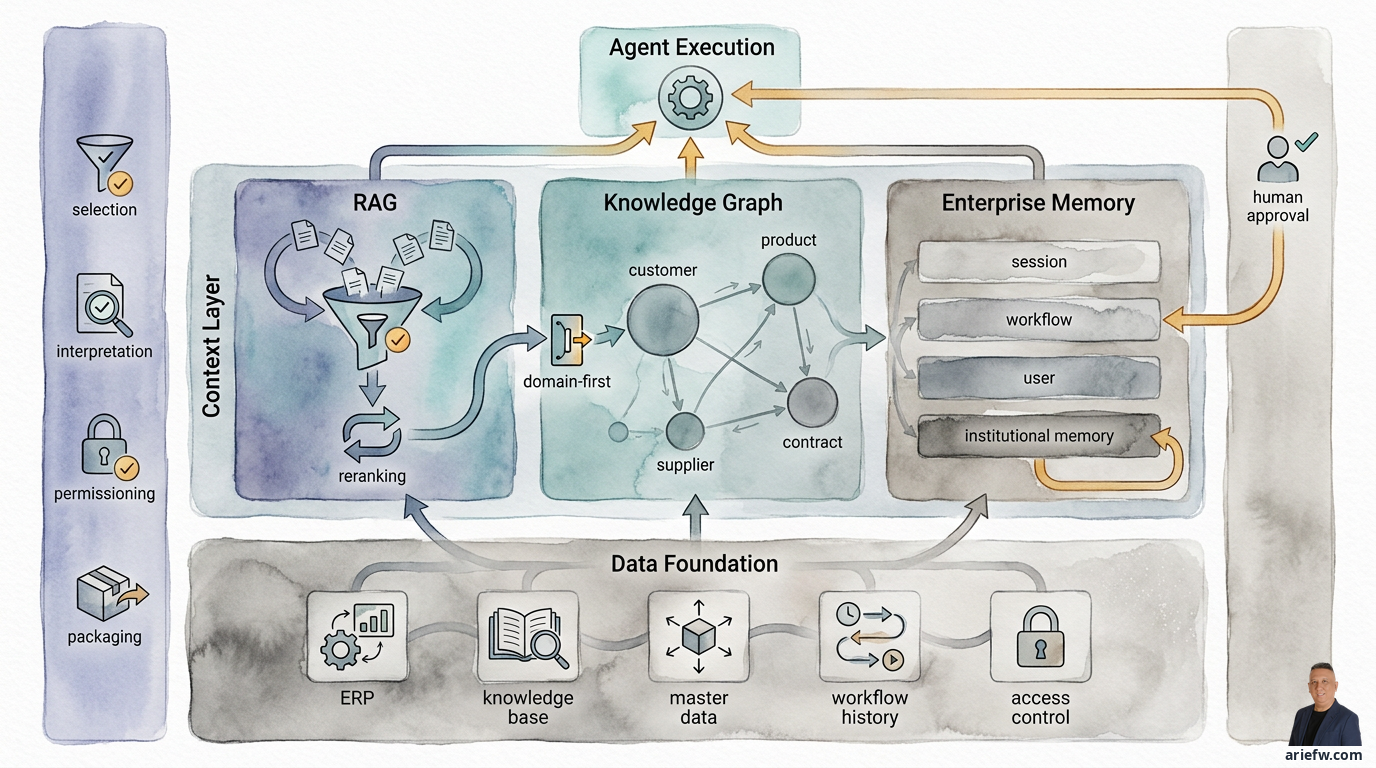
The context layer sits between your data foundation and agent execution, with four control functions ensuring agents get the right, safe, and usable context.
RAG: retrieval that respects boundaries
The most common component of a context layer is retrieval-augmented generation (RAG). Its job is straightforward: help the agent find relevant documents from the enterprise knowledge base and use them to answer, reason, or prepare an action.
For many use cases, this is a sensible starting point. Service desks reading knowledge articles. HR operations answering policy questions. Procurement referencing SOPs and contracts. Legal ops comparing clauses.
But good RAG is far harder than dumping documents into a vector database. Its quality is determined by six factors upstream of the search itself:
Source quality. If your corpus mixes official policies, old drafts, informal emails, and orphaned files, retrieval will produce noise. RAG is only as good as its corpus.
Chunking strategy. Documents must be split into retrievable units. Too large, and retrieval is fuzzy. Too small, and context breaks. Enterprise chunking should follow business document structure, not character counts.
Metadata. Often more important than embeddings. Effective dates, version numbers, region, function, confidentiality level, active status, and document owner all make retrieval far more precise.
Search strategy. Similarity search alone rarely suffices. Combine semantic search, keyword filters, metadata filters, and sometimes query expansion based on workflow context.
Reranking. Initial results need reordering so the most relevant and authoritative pieces appear first—especially when multiple documents seem similar but have different business status.
Answer evaluation. Don't judge RAG by whether the answer "sounds good." Test whether the agent actually retrieved the right document, cited a current policy, avoided mixing conflicting sources, and produced a genuinely useful answer.
One of the most dangerous mistakes: building technically clever RAG that is blind to permissions. An agent should not retrieve a document just because it's semantically relevant. It must also check whether that document is accessible to the user or workflow it represents. Permission-aware RAG applies access control during retrieval, not after the answer is formed.
Knowledge graphs: when relationships matter more than documents
If RAG helps agents find what is written, knowledge graphs help them understand what is connected to what. A knowledge graph explicitly represents business entities and their relationships: customers, products, suppliers, contracts, assets, locations, policies, risks, employees, cases. And the relationships between them: a customer has a contract, a supplier provides components for a product, a product is subject to a specific policy.
For enterprise agents, graphs are valuable because many operational decisions cannot be made from a single document or table. They depend on a web of relationships.
Consider a supply chain control tower. When a shipment is delayed, the agent needs to understand: which customer order is this shipment tied to? What products are in that order? Which suppliers do those products depend on? Does that customer have a priority SLA? Which locations are affected? Are there escalation policies? All of this is far easier to model as a graph than as a stack of documents.
Many organizations avoid knowledge graphs because they imagine a massive, expensive, enterprise-wide project. That's unnecessary. A more realistic approach: start with domain-specific graphs for priority use cases. A graph for vendor-contract-category-policy relationships in procurement. A graph for customer-product-ticket-SLA in customer service. A graph for entity-account-journal-control in finance close.
Domain-first graphs deliver three advantages: faster time to value, easier validation by business owners, and simpler governance than trying to map the entire company at once.
Enterprise memory: remembering without enshrining mistakes
The third component is memory. Memory allows an agent to retain context that isn't available in a single prompt or query. This matters because most enterprise work spans multiple steps, multiple days, and sometimes multiple teams.
But memory in an enterprise must be disciplined. Not everything needs to be remembered, and not all memories should be treated equally.
Four types of memory need distinction:
Session memory: Context within a single conversation or interaction. The agent remembers you're discussing invoice #4023. Useful for coherence, but usually doesn't need long-term storage.
Workflow memory: Status of ongoing work. What steps have been completed, what documents have been reviewed, what decisions have been made, who has approved, what exceptions remain open. Critical for workflows like finance close, procurement case management, or incident response.
User memory: Specific preferences or context about a user—preferred report format, working patterns. Can improve experience but must be managed carefully due to privacy and fairness concerns.
Institutional memory: Longer-lasting organizational learning. Patterns of recurring exceptions, treatments that worked before, human feedback on agent recommendations, repeated operational knowledge. Most valuable for continuous improvement, but also most risky if uncurated.
Without memory, agents operate like they have operational amnesia. Every case starts from zero. Handoffs between sessions are poor. Previous decisions are ignored. Human feedback is lost. Long workflows become fragile.
In IT operations, an agent handling recurring incidents should remember which runbook worked before, who the relevant approver is, and what system dependencies are common root causes. In collections, an agent should remember previous promise-to-pay commitments, customer responses, and follow-up actions already taken—so it doesn't send contradictory communications.
Enterprise memory requires four minimum disciplines: retention (what is stored, for how long, when deleted), privacy (memory may contain sensitive data, so storage and use must follow strict access policies), audit (the company must be able to explain what memory was used to produce a recommendation), and correction (if an agent stores a wrong conclusion, human feedback must be able to correct or flag that memory).
The architecture decision that determines trust
RAG, knowledge graphs, and memory don't replace each other. They complement each other. RAG helps agents retrieve relevant knowledge from documents. Knowledge graphs help agents understand business entity relationships. Memory helps agents maintain continuity across sessions, workflows, and operational learning.
In a mature enterprise workflow, all three work together. In procurement exception handling, RAG retrieves the relevant purchasing policy and contract clauses, the graph shows relationships between requester, category, supplier, contract, and approval path, and memory recalls that a similar case was previously rejected due to incomplete documentation. In finance close, RAG retrieves accounting guidance and closing SOPs, the graph maps entity-account-journal-control relationships, and memory stores the history of exceptions and previous controller decisions.
This is where the context layer becomes an execution layer, not just a search layer.
What this means for builders
If you're building agentic systems for enterprise workflows, here's your checklist:
Start with the decision, not the model. Before writing any agent code, map out what context the agent needs to make a safe decision. List every data source, relationship, and memory requirement.
Design for permission boundaries. Your retrieval pipeline must be permission-aware from day one. Don't add access control as an afterthought.
Use domain-specific graphs. Don't try to build a company-wide knowledge graph. Start with the graph for one business domain—procurement, finance close, customer service—and validate it with domain experts.
Implement memory with hygiene. Distinguish session, workflow, user, and institutional memory. Each has different retention, privacy, audit, and correction requirements.
Evaluate context quality, not just answer quality. Test whether your agent retrieves the right document, respects access controls, and maintains continuity across multi-step workflows.
Implementation lens
Let's make this concrete. Here's how you might approach building a context layer for a finance close agent:
RAG layer: Index your accounting policies, closing SOPs, and regulatory guidance. Use metadata filters for effective date (active vs. expired), document type (policy vs. guidance), and region. Implement permission filters so the agent only retrieves documents accessible to the user's role.
Knowledge graph layer: Model entities like legal entities, accounts, journal entries, controls, and approvers. Define relationships: which accounts belong to which entity, which controls apply to which account types, which approvers are authorized for which journal entry thresholds.
Memory layer: Store workflow memory (which steps are complete, which exceptions are open), session memory (current case context), and institutional memory (patterns of exceptions that were approved or rejected in previous close cycles). Implement retention policies: session memory expires after 24 hours, workflow memory persists until case closure, institutional memory requires human review before storage.
Integration: When the agent processes a journal entry exception, it retrieves the relevant policy via RAG, checks the graph for the account-entity-control relationships, and consults memory for whether similar exceptions were approved last quarter. The context layer packages all of this into a structured prompt that the agent can act on.
This isn't theoretical. Teams building this today are seeing measurable reductions in hallucination rates and human review time.
Further reading
This article is part of a broader series on building trustworthy AI agents for enterprise operations. For the full discussion of context layer architecture, including detailed implementation patterns and governance frameworks, read the complete guide at ariefwara.github.io/ai-for-business/en/context-layer.